
Programming Concepts and Logics
Class 11 Computer Science Notes • NEB Syllabus
Syllabus, solved multiple choice questions, short and long answer questions with tested C programs and flowcharts, handwritten PDF notes and frequently asked questions on programming concepts and the C language.
1. Syllabus
Unit 5: Programming Concepts and Logics
These notes follow the NEB Class 11 Computer Science syllabus (Nepal). Practise the multiple choice questions first, then work through the solved Short Answer Questions, and finish with the PDF notes for quick revision.
2. Multiple Choice Questions
Question 1. A computer understands:
- a) Machine level language
- b) Assembly level language
- c) High level language
- d) None of them
Correct Answer: a) Machine level language
Reason: The CPU can run only binary instructions made of 0s and 1s. That is machine language. Assembly and high level programs must be translated into it first.
Question 2. Which language is a machine-dependent language?
- a) Machine level language
- b) Assembly level language
- c) High level language
- d) Both a and b
Correct Answer: d) Both a and b
Reason: Machine and assembly programs are written for the instruction set of one type of CPU, so they do not run on another type. High level languages are machine-independent.
Question 3. Which programming language uses mnemonic codes?
- a) Assembly level language
- b) Machine level language
- c) High level language
- d) All of them
Correct Answer: a) Assembly level language
Reason: Assembly language uses short codes such as ADD, SUB and MOV (mnemonics) in place of binary instructions.
Question 4. Converts assembly level language to machine level language:
- a) Assembler
- b) Compiler
- c) Interpreter
- d) All of them
Correct Answer: a) Assembler
Reason: The language processor of assembly language is the assembler. Compilers and interpreters translate high level languages.
Question 5. Converts high-level language to machine-level language statement by statement:
- a) Assembler
- b) Compiler
- c) Interpreter
- d) All of them
Correct Answer: c) Interpreter
Reason: An interpreter takes one statement, translates it, runs it, and then moves to the next statement.
Question 6. Converts high-level language to machine-level language for the whole program at once:
- a) Assembler
- b) Compiler
- c) Interpreter
- d) All of them
Correct Answer: b) Compiler
Reason: A compiler reads the full source program and translates it into an object program in one go, if there is no error.
Question 7. Which is not a language processor?
- a) Assembler
- b) Interpreter
- c) Compiler
- d) None of them
Correct Answer: d) None of them
Reason: Assembler, interpreter and compiler are all language processors. So there is no option that is “not a language processor”, and the answer is “None of them”.
Question 8. Which type of error doesn’t allow executing the program?
- a) Run time error
- b) Semantic error
- c) Syntax error
- d) All of them
Correct Answer: c) Syntax error
Reason: A syntax error breaks the grammar rules of the language, so the compiler cannot translate the program and it will not run. A semantic error gives wrong output, and a run time error stops the program only while it is running.
Question 9. “If statement” is an example of?
- a) Sequential structure
- b) Selective structure
- c) Repetitive structure
- d) All of them
Correct Answer: b) Selective structure
Reason: The if statement tests a condition and chooses which statements to run. Choosing by a condition is selection.
Question 10. “for statement” is an example of?
- a) Sequential structure
- b) Selective structure
- c) Repetitive structure
- d) All of them
Correct Answer: c) Repetitive structure
Reason: A for statement repeats a block of statements many times, so it is an iteration (repetitive) structure.
Question 11. A program design tool which represents a set of instructions in a sequential statement format is:
- a) Algorithm
- b) Flowchart
- c) Pseudo code
- d) Decision Table
Correct Answer: a) Algorithm
Reason: An algorithm is a step by step list of instructions, written as numbered statements.
Question 12. A program design tool which represents a set of instructions in a pictorial format is:
- a) Algorithm
- b) Flowchart
- c) Pseudo code
- d) Decision Table
Correct Answer: b) Flowchart
Reason: A flowchart shows the steps with symbols and arrows, so it is a picture of the logic.
Question 13. A program design tool which represents a set of instructions in a simple language is:
- a) Algorithm
- b) Flowchart
- c) Pseudo code
- d) Decision Table
Correct Answer: c) Pseudo code
Reason: Pseudo code is written in simple English that looks like a program but does not follow the strict syntax of any language.
Question 14. Which is the basic data type in C language?
- a) char
- b) float
- c) int
- d) All of them
Correct Answer: d) All of them
Reason: char, int and float are all basic (primary) data types of C. double and void are also basic types.
Question 15. In BCD, each decimal digit is expressed in a group of …. bits.
- a) 4
- b) 6
- c) 8
- d) 2
Correct Answer: a) 4
Reason: BCD (Binary Coded Decimal) writes every decimal digit as its own 4 bit binary number. For example 25 becomes 0010 0101.
Question 16. Unicode uses …… bit numbers.
- a) 8
- b) 16
- c) 32
- d) 64
Correct Answer: b) 16
Reason: As given in the textbook, Unicode uses 16 bit numbers, so it can represent 65,536 different characters. (Newer forms of Unicode use more bits, but 16 is the answer expected in the exam.)
Question 17. A preprocessor begins with:
- a) $
- b) %
- c) #
- d) &
Correct Answer: c) #
Reason: Preprocessor directives such as #include and #define start with the # sign.
Question 18. AND operator is represented by …. sign in C.
- a) &
- b) &&
- c) !
- d) %
Correct Answer: b) &&
Reason: && is the logical AND. A single & is the bitwise AND.
Question 19. OR operator is represented by …. sign in C.
- a) |
- b) ||
- c) !
- d) %
Correct Answer: b) ||
Reason: || is the logical OR. A single | is the bitwise OR.
Question 20. NOT operator is represented by …. sign in C.
- a) ~
- b) &&
- c) !
- d) %
Correct Answer: c) !
Reason: ! is the logical NOT. It changes true to false and false to true. (~ is the bitwise NOT.)
Question 21. Remainder operator is represented by …. sign in C.
- a) /
- b) &&
- c) !
- d) %
Correct Answer: d) %
Reason: % gives the remainder of an integer division. For example 17 % 5 is 2.
Question 22. Which format specifier represents an integer?
- a) %d
- b) %c
- c) %i
- d) %ld
Correct Answer: a) %d
Reason: %d is used for int values in printf() and scanf(). (%i also works for an int, but %d is the answer the textbook expects. %ld is for long int.)
Question 23. Which format specifier represents a float?
- a) %d
- b) %c
- c) %f
- d) %ld
Correct Answer: c) %f
Reason: %f is used for float values.
Question 24. Which format specifier represents a character?
- a) %d
- b) %c
- c) %f
- d) %ld
Correct Answer: b) %c
Reason: %c is used for a single character.
Question 25. Which format specifier represents a long integer?
- a) %d
- b) %c
- c) %f
- d) %ld
Correct Answer: d) %ld
Reason: %ld is used for a long int value.
Question 26. Which string operator is useful to find the reverse of a string?
- a) strupr
- b) strlwr
- c) strrev
- d) strcpy
Correct Answer: c) strrev
Reason: strrev(s) reverses the string s. “Nepal” becomes “lapeN”.
Question 27. Which string operator is useful to convert a string into lower case?
- a) strupr
- b) strlwr
- c) strrev
- d) strcpy
Correct Answer: b) strlwr
Reason: strlwr(s) changes all letters of s to lower case.
Question 28. Which string operator is useful to convert a string into upper case?
- a) strupr
- b) strlwr
- c) strrev
- d) strcpy
Correct Answer: a) strupr
Reason: strupr(s) changes all letters of s to upper case.
Question 29. Which string operator is useful to copy one string variable to another string variable?
- a) strupr
- b) strlwr
- c) strrev
- d) strcpy
Correct Answer: d) strcpy
Reason: strcpy(a, b) copies the string b into a.
Question 30. ASCII is a …… bit code.
- a) 4
- b) 7
- c) 16
- d) 32
Correct Answer: b) 7
Reason: The standard ASCII code uses 7 bits and has 128 characters (0 to 127). Extended ASCII uses 8 bits and has 256 characters.
Question 31. Which header file contains the functions printf() and scanf()?
- a) stdio.h
- b) conio.h
- c) string.h
- d) math.h
Correct Answer: a) stdio.h
Reason: stdio.h means standard input output header. conio.h has getch() and clrscr(), string.h has string functions and math.h has mathematical functions.
Question 32. The execution of every C program starts from:
- a) the first function written
- b) the main() function
- c) the last statement
- d) the #include line
Correct Answer: b) the main() function
Reason: Whatever order the functions are written in, the operating system starts a C program from main().
Question 33. Which of the following is a valid identifier in C?
- a) 2sum
- b) total_marks
- c) my-name
- d) float
Correct Answer: b) total_marks
Reason: An identifier must begin with a letter or underscore and can have only letters, digits and underscore. 2sum starts with a digit, my-name has a hyphen, and float is a keyword.
Question 34. Which of the following is a keyword in C?
- a) Main
- b) printf
- c) while
- d) scanf
Correct Answer: c) while
Reason: while is one of the 32 reserved words of C. printf and scanf are library functions, and Main (capital M) is just an ordinary name.
Question 35. The index of the first element of an array in C is:
- a) 0
- b) 1
- c) -1
- d) depends on the compiler
Correct Answer: a) 0
Reason: Array indexing starts from 0. In int a[5] the elements are a[0] to a[4].
Question 36. Which function is used to find the length of a string?
- a) strlen()
- b) strcat()
- c) strcmp()
- d) strcpy()
Correct Answer: a) strlen()
Reason: strlen(s) returns the number of characters in s, not counting the null character.
Question 37. Which code can represent the characters of almost all languages of the world, including Nepali?
- a) ASCII
- b) BCD
- c) Unicode
- d) Absolute binary
Correct Answer: c) Unicode
Reason: ASCII has only English letters, digits and symbols. Unicode gives a number to the characters of all major languages, including Devanagari used for Nepali.
Question 38. Every statement in C must end with:
- a) a full stop
- b) a colon
- c) a semicolon
- d) a comma
Correct Answer: c) a semicolon
Reason: The semicolon ( ; ) is the statement terminator in C. Missing it is a common syntax error.
3. Short Answer Questions
The systematic method of making a computer program is called programming. A programmer studies the problem, plans the steps, writes the code, tests it and fixes the errors.
Features of a good program:
A programming language is an artificial language used to give data and instructions to the computer so that it does a particular task. A computer cannot understand English, so programs are written in a programming language.
On the basis of their development, programming languages are of the following types.
| Type | Advantages | Disadvantages |
|---|---|---|
| Machine level language | Runs fastest, because the computer understands it directly. Needs no translator. | Very hard to write, all in 0s and 1s. Slow to develop. Machine-dependent. |
| Assembly level language | Easier than machine language because of mnemonics. Runs faster than high level languages. | Machine-dependent. A program for one processor does not work on another. |
| High level language | Fast to develop and easy to learn. Machine-independent. | Needs a compiler or interpreter. Execution is slower than low level languages. |
Some high level languages are:
System software is a group of programs that controls and manages the computer hardware and lets the user work with it. It does not solve one particular problem of the user. It runs the computer, controls memory, CPU and other devices such as printers, and runs the application programs. Operating systems, device drivers and language processors are system software.
Language processors translate a program written in a programming language into machine language. There are three kinds:
| S.N. | Compiler | Interpreter |
|---|---|---|
| 1. | It translates the whole program at once, and then the program is executed. Translation and execution are two separate phases. | It translates and executes one statement at a time, so translation and execution go together. |
| 2. | It creates an object code. | It does not create an object code. |
| 3. | It shows all the errors together at the end of compilation. | It shows an error as soon as it finds it, one by one. |
| 4. | The program runs fast after compiling. | The program runs slowly, because each statement is translated every time it runs. |
| 5. | Debugging is comparatively harder. | Debugging is easier. |
| 6. | The program will not compile until all errors are removed. | It runs the statements and stops when it meets an error. |
| 7. | Examples: C, C++. | Examples: BASIC, LISP. |
| S.N. | Program | Software |
|---|---|---|
| 1. | A set of instructions. | A set of programs (and related documents). |
| 2. | Can be written by one person. | Usually developed by a group of people. |
| 3. | Small in size and uses less memory. | Large in size and needs more memory. |
| 4. | Limited functions. | Wide range of functions. |
| 5. | Usually not well documented. | Well documented, so the user can learn to use it easily. |
Syntax means the grammar rules of a programming language. These rules tell how the words, symbols and statements can be written and joined. If a statement breaks a rule, it is a syntax error. Example: a missing semicolon, a misspelt keyword or a bracket that is not closed.
Semantics means the meaning of a statement, that is, what it does when the program runs. A statement can be correct in grammar but wrong in meaning. This is a semantic (logical) error. The program runs, but gives a wrong answer. Example: writing avg = a + b / 2; when you want the average of a and b. The correct statement is avg = (a + b) / 2;.
A syntax error is caught by the compiler, but a semantic error has to be found by the programmer by testing the output.
A bug is a fault in a program that makes it give wrong output or stop working. Finding and removing bugs is called debugging.
| Error | Meaning | Example in C |
|---|---|---|
| Syntax error | Breaks the grammar rules. The program cannot be compiled or run. | printf("Hello") with the semicolon missing |
| Semantic (logical) error | The program runs but the logic is wrong, so the output is wrong. | Using + where * is needed |
| Runtime error | The program starts but stops while running, because of an illegal operation. | Dividing a number by zero |
The structures that control the order in which the statements of a program are executed are called control structures. A program is designed using three control structures.
Figure: The three control structures: sequence, selection and iteration
“Pseudo” means false. So pseudo-code is a false code. It is the logic of a program written in simple English statements. It looks like a program but it is not written in any real language, so it does not need the correct syntax and a computer cannot run it. It is also called structured English. Programmers write it before the real code because it is easy to write and easy to change.
Pseudo-code to find the largest of three numbers
Input a, b, c
If a >= b and a >= c then
    Largest = a
Else if b >= a and b >= c then
    Largest = b
Else
    Largest = c
End if
Print Largest
Note: the signs >= are used so that the logic also works when two numbers are equal.
Program documentation is the written description of a program and the system around it. Some of it is inside the program as comments. The rest is on paper or in files: the aim of the program, system analysis, the logic used, flowcharts, program code, limitations and a user manual.
Types of documents
Why it is needed
A flowchart is the picture of a program or an algorithm. The steps are drawn with standard symbols and joined by arrows to show the flow of the logic. It makes a problem easy to understand.
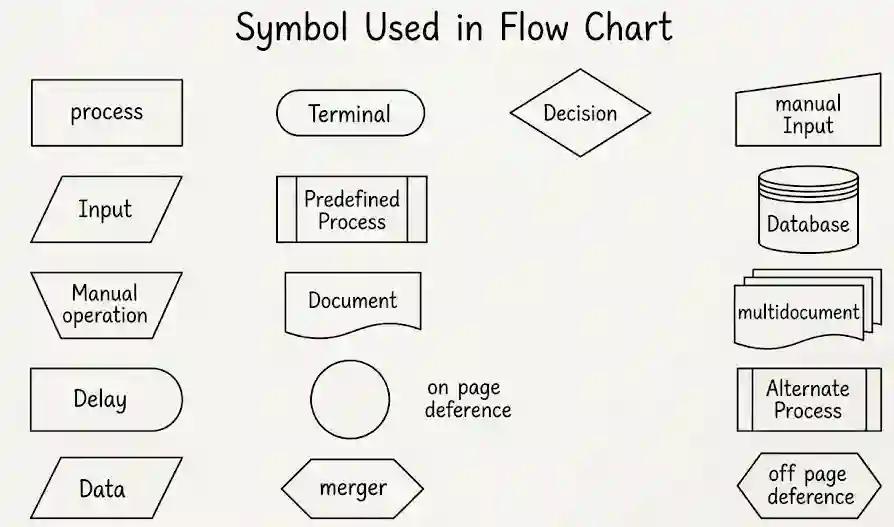
Figure: Basic flowchart symbols and what they mean
| Program flowchart | System flowchart |
|---|---|
| Shows the logic of one particular program, step by step. | Shows the flow of data and the sequence of operations in the whole system. |
| Used by the programmer to solve a particular problem. | Gives an overview of the system, inside and outside the computer. |
| Uses detailed symbols like decision and process. | Uses symbols for documents, files and processes. |
Advantages: useful when the program has to be modified, and it gives good documentation. Disadvantages: drawing takes time, a change means redrawing, and it becomes complicated for programs with many branches and loops.
Program debugging is the process of finding and removing the errors (bugs) of a program. Hardly any program runs correctly the first time, so debugging is a necessary and time-consuming part of program development.
| Syntax error | Logical error |
|---|---|
| Mistake in the grammar of the language. | Mistake in the logic or meaning of the program. |
| The compiler or interpreter shows it and does not allow the program to run. | The program runs but gives wrong output. |
| Easy to find and correct. | Difficult to find, because there is no error message. |
Example: prinf("Hi"); | Example: area = l + b; for a rectangle. |
A language is called a high level language when it has these characteristics:
An algorithm is a finite set of steps that, if followed, solves a particular problem. Every task in our daily life, such as making tea, follows some steps. When these steps are written for the computer, they form an algorithm.
Algorithm for the commission
Step 1: Start
Step 2: Read the sales amount SA
Step 3: If SA < 500 then
            commission = SA * 2 / 100
        Else if SA < 5000 then
            commission = SA * 5 / 100
        Else
            commission = SA * 10 / 100
Step 4: Print commission
Step 5: Stop
Check: for SA = 4000 the commission is 4000 × 5 / 100 = Rs. 200. For SA = 6000 it is 6000 × 10 / 100 = Rs. 600.
Algorithm. An algorithm is a finite list of steps, each step written in plain words, that solves a problem. Example: an algorithm to add any two numbers.
Step 1: Start
Step 2: Read two numbers a and b
Step 3: c = a + b
Step 4: Print c
Step 5: Stop
Flowchart. A flowchart is the pictorial form of an algorithm. The same steps are drawn with flowchart symbols and arrows. Here is the flowchart of the algorithm above.
Figure: Flowchart to add any two numbers
A program design tool helps the programmer to plan the logic before writing the code. The tools are:
Computers store everything as 0s and 1s, so numbers and characters need a code.
| Code | Bits | Example for 25 or A |
|---|---|---|
| Absolute binary | as many as needed | 25 → 11001 |
| BCD | 4 bits per digit | 25 → 0010 0101 |
| ASCII | 7 bits (8 in extended) | A → 1000001 |
| Unicode | 16 bits | A → 0000 0000 0100 0001 |
C Programming Language
C is a general purpose programming language developed by Dennis Ritchie at AT&T Bell Laboratories, USA, in 1972. It was first used to write the UNIX operating system. C is called a middle level language, because it has the easy statements of a high level language and also lets the programmer work close to the hardware like a low level language.
Why C is a structured language: in C a big problem is broken into small parts called functions, and each function does one job. The program is written using only the three control structures (sequence, selection and iteration), so the flow is clear and it is easy to read, test and correct. This style is called structured programming.
Features of C
A C program is written in a fixed order. The parts are:
/* Program to print a message */          <- comment
#include<stdio.h>                           <- preprocessor section
#include<conio.h>
void main()                                 <- main function
{
    printf("Welcome to C");                 <- statement
    getch();
}
Each statement ends with a semicolon, and the body of a function is placed between { and }.
The preprocessor is a part of the C compiler that works before the real compilation begins. It handles the lines that start with the # sign, called preprocessor directives. These lines do not end with a semicolon.
#include adds the contents of another file into the program.#define gives a name to a constant. For example #define PI 3.14159 replaces every PI by 3.14159.Header files are files that have the declarations of library functions. They end with .h. A function can be used only after its header file is included.
| Header file | Used for | Example functions |
|---|---|---|
| stdio.h | standard input and output | printf(), scanf(), getchar(), putchar(), gets(), puts() |
| conio.h | console input and output | clrscr(), getch() |
| string.h | string handling | strlen(), strcpy(), strcat(), strcmp(), strrev() |
| math.h | mathematical functions | sqrt(), pow(), abs() |
| ctype.h | character testing | isalpha(), toupper() |
#include<stdio.h>
#define PI 3.14159
void main()
{
    float r = 2, area;
    area = PI * r * r;
    printf("%f", area);
}/* and */. A single-line comment starts with //.Age and age are different. Valid: total_marks, sum1, _x. Invalid: 1st, my-name, float.int a = 5; the tokens are int, a, =, 5 and ;.Keywords are words that have a fixed meaning for the C compiler. They are reserved for special purposes, so they cannot be used as names of variables. They are written in lower case. Standard C has 32 keywords.
| auto | break | case | char | const |
| continue | default | do | double | else |
| enum | extern | float | for | goto |
| if | int | long | register | return |
| short | signed | sizeof | static | struct |
| switch | typedef | union | unsigned | void |
| volatile | while |
A constant is a value that does not change while the program is running. Constants are also called literals. For example, 5, 3.14 and ‘A’ are constants.
A variable is a name given to a memory location, where a value is kept. The value of a variable can change during the program. Before use, a variable must be declared with its data type, for example int x;.
For example, in x = 5; the 5 is a constant and x is a variable. Later x can hold 8 or 10, but the constant 5 is always 5.
There are two groups of constants in C: primary and secondary.
a. Primary constants
b. Secondary constants: arrays, structures, pointers, unions and enums.
A data type tells the compiler what kind of value a variable will keep and how much memory it needs.
| Data type | Keeps | Size (Turbo C) | Specifier | Example |
|---|---|---|---|---|
| char | a single character | 1 byte | %c | char gender = ‘m’; |
| int | a whole number | 2 bytes | %d | int age = 67; |
| float | a decimal number (about 6 digits) | 4 bytes | %f | float weight = 74.54; |
| double | a decimal number of more digits | 8 bytes | %lf | double pi = 3.14159265; |
| void | nothing (no value) | 0 | – | void main() |
The size of int depends on the compiler. It is 2 bytes in Turbo C and 4 bytes in most modern compilers. The modifiers short, long, signed, unsigned change the size or range. For example, long int takes 4 bytes and is printed with %ld.
A format specifier starts with the % sign followed by a letter. It tells printf() and scanf() the type of the data to print or read. It is also called a conversion specification.
| Data type | Format specifier |
|---|---|
| int | %d |
| long int | %ld |
| float | %f |
| double | %lf |
| character | %c |
| string | %s |
| unsigned int | %u |
int a = 10;
float b = 2.5;
char c = 'x';
printf("%d %f %c", a, b, c);Statement. A statement is an instruction to the computer. It ends with a semicolon. The kinds are the declaration statement (int a;), the expression statement (a = b + 2;), the compound statement (many statements inside { }) and control statements (if, for, while).
Operator. A symbol that does an operation on data. The data it works on is called an operand. The groups of operators are arithmetic (+ – * / %), relational (< > <= >= == !=), logical (&& || !), assignment (=, +=, -=), increment and decrement (++, –), and conditional (? :).
Expression. A combination of operands and operators that gives one value. Examples: a + b, x * y - 5, a > b.
In an expression, brackets are solved first, then * / %, then + -, and the assignment = comes last. So 2 + 3 * 4 is 14, and (2 + 3) * 4 is 20.
Input and output functions are in the header file stdio.h. Input means taking data from the keyboard, and output means showing data on the screen.
| Function | Use | Example |
|---|---|---|
| scanf() | reads values of any type from the keyboard | scanf(“%d”, &a); |
| printf() | prints text and values on the screen | printf(“Sum = %d”, s); |
| getchar() | reads one character (needs Enter) | ch = getchar(); |
| putchar() | prints one character | putchar(ch); |
| gets() | reads a whole line of text, with spaces | gets(name); |
| puts() | prints a string and goes to a new line | puts(name); |
The & sign before a variable name in scanf() gives the address of the variable, so the typed value is stored there. For a string, the & is not used.
int a;
printf("Enter a number: ");
scanf("%d", &a);
printf("You entered %d", a);getchar() reads only one character at a time. It shows the typed character on the screen and waits for the Enter key. putchar() also prints only one character at a time. So to read or print a string such as “Nepal”, the functions must be used again and again inside a loop, which makes the program long.
For strings it is better to use gets() and puts(), or scanf("%s", name) (which stops at the first space).
Programs on Selection (if, if-else, switch)
A number is even when it leaves remainder 0 on division by 2. Otherwise it is odd.
#include<stdio.h>
#include<conio.h>
void main()
{
    int a;
    printf("Enter a number: ");
    scanf("%d", &a);
    if(a % 2 == 0)
        printf("Even");
    else
        printf("Odd");
    getch();
}
Sample input
7Output
Enter a number: OddThe first number is compared with the other two. If it is not the largest, the second is compared in the same way. The last number is the largest if both fail. The sign >= is used so that the program also works when two numbers are equal.
#include<stdio.h>
#include<conio.h>
void main()
{
    int a, b, c;
    printf("Enter any three numbers: ");
    scanf("%d%d%d", &a, &b, &c);
    if(a >= b && a >= c)
        printf("Largest = %d", a);
    else if(b >= a && b >= c)
        printf("Largest = %d", b);
    else
        printf("Largest = %d", c);
    getch();
}
Sample input
12 45 30Output
Enter any three numbers: Largest = 45if(condition)
{
statements;
}if-else: runs one block when the condition is true and another when it is false.
if(condition)
{
    statements 1;
}
else
{
    statements 2;
}
else-if ladder: used when there are many conditions. The first true condition is run and the rest are skipped.
if(condition 1)
    statements 1;
else if(condition 2)
    statements 2;
else
    statements 3;
switch: chooses one block out of many by matching the value of an expression with the case labels. The break statement stops the control from falling into the next case. The default block runs when no case matches.
switch(expression)
{
    case value1: statements; break;
    case value2: statements; break;
    default: statements;
}while loop checks the condition first, then runs the body.
i = 1;
while(i <= 5)
{
    printf("%d ", i);
    i++;
}
do-while loop runs the body once first, then checks the condition. Note the semicolon after the condition.
i = 1;
do
{
    printf("%d ", i);
    i++;
} while(i <= 5);
for loop keeps the initial value, the condition and the update in one line.
for(i = 1; i <= 5; i++)
{
    printf("%d ", i);
}
Output of all three loops
1 2 3 4 5#include<stdio.h>
#include<conio.h>
void main()
{
int marks;
printf("Enter marks: ");
scanf("%d", &marks);
if(marks >= 40)
printf("Pass");
else
printf("Fail");
getch();
}Sample input
56Output
Enter marks: PassIf the two numbers are equal, neither is greater, so the program says so.
#include<stdio.h>
#include<conio.h>
void main()
{
    int a, b;
    printf("Enter two numbers: ");
    scanf("%d%d", &a, &b);
    if(a > b)
        printf("%d is greater", a);
    else if(b > a)
        printf("%d is greater", b);
    else
        printf("Both numbers are equal");
    getch();
}
Sample input
8 15Output
Enter two numbers: 15 is greater#include<stdio.h>
#include<conio.h>
void main()
{
int n;
printf("Enter a number: ");
scanf("%d", &n);
if(n % 5 == 0)
printf("Divisible by 5");
else
printf("Not divisible by 5");
getch();
}Sample input
35Output
Enter a number: Divisible by 5Both conditions must be true, so the logical AND (&&) is used.
#include<stdio.h>
#include<conio.h>
void main()
{
    int n;
    printf("Enter a number: ");
    scanf("%d", &n);
    if(n % 5 == 0 && n % 7 == 0)
        printf("Divisible by both 5 and 7");
    else
        printf("Not divisible by both");
    getch();
}
Sample input
70Output
Enter a number: Divisible by both 5 and 7Use == to compare. A single = is the assignment sign.
#include<stdio.h>
#include<conio.h>
void main()
{
    int a, b;
    printf("Enter two numbers: ");
    scanf("%d%d", &a, &b);
    if(a == b)
        printf("The numbers are equal");
    else
        printf("The numbers are not equal");
    getch();
}
Sample input
9 9Output
Enter two numbers: The numbers are equal#include<stdio.h>
#include<conio.h>
void main()
{
int a, b;
printf("Enter two numbers: ");
scanf("%d%d", &a, &b);
if(a < b)
printf("Smaller = %d", a);
else
printf("Smaller = %d", b);
getch();
}Sample input
23 17Output
Enter two numbers: Smaller = 17#include<stdio.h>
#include<conio.h>
void main()
{
int n;
printf("Enter a number: ");
scanf("%d", &n);
if(n >= 100)
printf("The number is 100 or more");
else
printf("The number is less than 100");
getch();
}Sample input
100Output
Enter a number: The number is 100 or more#include<stdio.h>
#include<conio.h>
void main()
{
float sales, comm;
printf("Enter monthly sales: ");
scanf("%f", &sales);
if(sales >= 1000)
comm = sales * 10 / 100;
else
comm = sales * 5 / 100;
printf("Commission = %.2f", comm);
getch();
}Sample input
2500Output
Enter monthly sales: Commission = 250.00#include<stdio.h>
#include<conio.h>
void main()
{
int qty;
float rate, total, disc, net;
printf("Enter number of books and rate: ");
scanf("%d%f", &qty, &rate);
total = qty * rate;
if(total >= 1000)
disc = total * 10 / 100;
else
disc = total * 5 / 100;
net = total - disc;
printf("Total = %.2f\nDiscount = %.2f\nNet = %.2f", total, disc, net);
getch();
}Sample input
12 150Output
Enter number of books and rate: Total = 1800.00
Discount = 180.00
Net = 1620.00#include<stdio.h>
#include<conio.h>
void main()
{
int a, b, c;
printf("Enter three numbers: ");
scanf("%d%d%d", &a, &b, &c);
if(a >= b && a >= c)
printf("Biggest = %d", a);
else if(b >= c)
printf("Biggest = %d", b);
else
printf("Biggest = %d", c);
getch();
}Sample input
4 19 11Output
Enter three numbers: Biggest = 19#include<stdio.h>
#include<conio.h>
void main()
{
int n;
printf("Enter a number: ");
scanf("%d", &n);
if(n > 0)
printf("Positive");
else if(n < 0)
printf("Negative");
else
printf("Zero");
getch();
}Sample input
-6Output
Enter a number: NegativeIf sp is equal to cp there is neither gain nor loss, so a third case is added.
#include<stdio.h>
#include<conio.h>
void main()
{
    int sp, cp;
    printf("Enter selling price and cost price: ");
    scanf("%d%d", &sp, &cp);
    if(sp > cp)
        printf("Gain = %d", sp - cp);
    else if(cp > sp)
        printf("Loss = %d", cp - sp);
    else
        printf("No gain, no loss");
    getch();
}
Sample input
850 1000Output
Enter selling price and cost price: Loss = 150#include<stdio.h>
#include<conio.h>
void main()
{
float sales, comm;
printf("Enter daily sales: ");
scanf("%f", &sales);
if(sales <= 5000)
comm = sales * 0.05;
else if(sales <= 10000)
comm = sales * 0.10;
else
comm = sales * 0.15;
printf("Commission = %.2f", comm);
getch();
}Sample input
12000Output
Enter daily sales: Commission = 1800.00#include<stdio.h>
#include<conio.h>
void main()
{
int a, b, c;
printf("Enter three numbers: ");
scanf("%d%d%d", &a, &b, &c);
if(a <= b && a <= c)
printf("Smallest = %d", a);
else if(b <= c)
printf("Smallest = %d", b);
else
printf("Smallest = %d", c);
getch();
}Sample input
14 6 9Output
Enter three numbers: Smallest = 6A number is in the middle when it lies between the other two. The sign >= and <= take care of equal numbers.
#include<stdio.h>
#include<conio.h>
void main()
{
    int a, b, c;
    printf("Enter three numbers: ");
    scanf("%d%d%d", &a, &b, &c);
    if((a >= b && a <= c) || (a <= b && a >= c))
        printf("Middle = %d", a);
    else if((b >= a && b <= c) || (b <= a && b >= c))
        printf("Middle = %d", b);
    else
        printf("Middle = %d", c);
    getch();
}
Sample input
14 6 9Output
Enter three numbers: Middle = 9The conditions are checked from the biggest amount to the smallest, so the first true condition gives the right rate.
#include<stdio.h>
#include<conio.h>
void main()
{
    int qty;
    float rate, total, disc, net;
    printf("Enter number of books and rate: ");
    scanf("%d%f", &qty, &rate);
    total = qty * rate;
    if(total >= 10000)
        disc = total * 0.20;
    else if(total >= 5000)
        disc = total * 0.10;
    else if(total >= 1000)
        disc = total * 0.05;
    else
        disc = 0;
    net = total - disc;
    printf("Total = %.2f\nDiscount = %.2f\nNet = %.2f", total, disc, net);
    getch();
}
Sample input
50 160Output
Enter number of books and rate: Total = 8000.00
Discount = 800.00
Net = 7200.00#include<stdio.h>
#include<conio.h>
void main()
{
int m;
printf("Enter marks in English: ");
scanf("%d", &m);
if(m >= 90)
printf("A+");
else if(m >= 80)
printf("A");
else if(m >= 70)
printf("B+");
else if(m >= 60)
printf("B");
else if(m >= 50)
printf("C+");
else if(m >= 40)
printf("C");
else if(m >= 35)
printf("D");
else
printf("NG");
getch();
}Sample input
74Output
Enter marks in English: B+Programs on Loops and Arrays
Looping (iteration) means running a block of statements again and again until a condition becomes false. C has the while, do-while and for loops.
The even numbers are 2, 4, 6, … The i-th even number is 2 × i. So the loop runs from i = 1 to n and adds 2 × i each time.
#include<stdio.h>
#include<conio.h>
void main()
{
    int n, i, sum = 0;
    printf("Enter n: ");
    scanf("%d", &n);
    for(i = 1; i <= n; i++)
    {
        sum = sum + 2 * i;
    }
    printf("Sum of first %d even numbers = %d", n, sum);
    getch();
}
Sample input
5Output
Enter n: Sum of first 5 even numbers = 30Check: 2 + 4 + 6 + 8 + 10 = 30.
Algorithm
Step 1: Start
Step 2: Set count = 0 and i = 1
Step 3: Read salary
Step 4: If salary >= 5000 and salary <= 10000 then count = count + 1
Step 5: i = i + 1
Step 6: If i <= 200 go to Step 3
Step 7: Print count
Step 8: Stop
Program
#include<stdio.h>
#include<conio.h>
void main()
{
    int i, count = 0;
    float salary;
    for(i = 1; i <= 200; i++)
    {
        printf("Enter salary of employee %d: ", i);
        scanf("%f", &salary);
        if(salary >= 5000 && salary <= 10000)
            count++;
    }
    printf("Employees with salary from 5000 to 10000 = %d", count);
    getch();
}
Here is the same program tried for 5 employees, so that the output can be shown in a short space.
#include<stdio.h>
#include<conio.h>
void main()
{
    int i, count = 0;
    float salary;
    for(i = 1; i <= 5; i++)
    {
        scanf("%f", &salary);
        if(salary >= 5000 && salary <= 10000)
            count++;
    }
    printf("Employees with salary from 5000 to 10000 = %d", count);
    getch();
}
Sample input
4500 5000 7800 10000 12000Output
Employees with salary from 5000 to 10000 = 3| break | continue |
|---|---|
| Ends the loop completely. Control goes to the statement after the loop. | Skips the rest of the current round only. The loop goes on with the next round. |
| Can be used in loops and in switch. | Can be used only in loops. |
for(i = 0; i < 6; i++)
{
    if(i == 3)
        break;
    printf("%d ", i);
}
Output (break)
0 1 2for(i = 0; i < 6; i++)
{
if(i == 3)
continue;
printf("%d ", i);
}Output (continue)
0 1 2 4 5Program to print the first 10 terms of the series 1, 2, 3, …
#include<stdio.h>
#include<conio.h>
void main()
{
    int i;
    for(i = 1; i <= 10; i++)
    {
        printf("%d\t", i);
    }
    getch();
}
Output
1 2 3 4 5 6 7 8 9 10The last digit is taken with % 10. It is added to the reverse after multiplying the reverse by 10. Then the number is divided by 10 to remove the last digit. This is repeated four times, so a number like 1200 gives 0021 correctly.
#include<stdio.h>
#include<conio.h>
void main()
{
    int n, i, d;
    printf("Enter a four-digit number: ");
    scanf("%d", &n);
    printf("Reverse = ");
    for(i = 1; i <= 4; i++)
    {
        d = n % 10;
        printf("%d", d);
        n = n / 10;
    }
    getch();
}
Sample input
1250Output
Enter a four-digit number: Reverse = 0521Printing each digit as it is taken keeps the zeros of numbers like 1250, which gives 0521.
A matrix is stored in a two dimensional array. int a[2][2] has 2 rows and 2 columns, and the element in row i and column j is a[i][j]. Matrices of the same order are added or subtracted element by element: c[i][j] = a[i][j] + b[i][j] (or minus).
Matrix addition
#include<stdio.h>
#include<conio.h>
void main()
{
    int a[2][2], b[2][2], c[2][2], i, j;
    printf("Enter elements of first matrix: ");
    for(i = 0; i < 2; i++)
        for(j = 0; j < 2; j++)
            scanf("%d", &a[i][j]);
    printf("Enter elements of second matrix: ");
    for(i = 0; i < 2; i++)
        for(j = 0; j < 2; j++)
            scanf("%d", &b[i][j]);
    for(i = 0; i < 2; i++)
        for(j = 0; j < 2; j++)
            c[i][j] = a[i][j] + b[i][j];
    printf("\nSum of the matrices:\n");
    for(i = 0; i < 2; i++)
    {
        for(j = 0; j < 2; j++)
            printf("%d\t", c[i][j]);
        printf("\n");
    }
    getch();
}
Sample input
1 2 3 4   (first matrix)
5 6 7 8   (second matrix)
Output
Enter elements of first matrix: Enter elements of second matrix:
Sum of the matrices:
6	8
10	12
Matrix subtraction is the same program with c[i][j] = a[i][j] - b[i][j];. With the same input the output is:
Output
Difference of the matrices:
-4      -4
-4 -4#include<stdio.h>
#include<conio.h>
void main()
{
int age, i, count = 0;
for(i = 1; i <= 40; i++)
{
printf("Enter age of student %d: ", i);
scanf("%d", &age);
if(age >= 15 && age <= 22)
count++;
}
printf("Students with age from 15 to 22 = %d", count);
getch();
}The same program tried for 6 students:
#include<stdio.h>
#include<conio.h>
void main()
{
    int age, i, count = 0;
    for(i = 1; i <= 6; i++)
    {
        scanf("%d", &age);
        if(age >= 15 && age <= 22)
            count++;
    }
    printf("Students with age from 15 to 22 = %d", count);
    getch();
}
Sample input
14 15 18 22 23 17Output
Students with age from 15 to 22 = 4#include<stdio.h>
#include<conio.h>
void main()
{
int i;
for(i = 1; i <= 100; i++)
printf("%d ", i);
getch();
}Sample input
Output
1 2 3 4 5 6 7 8 9 10 11 12 13 14 15 16 17 18 19 20 21 22 23 24 25 26 27 28 29 30 31 32 33 34 35 36 37 38 39 40 41 42 43 44 45 46 47 48 49 50 51 52 53 54 55 56 57 58 59 60 61 62 63 64 65 66 67 68 69 70 71 72 73 74 75 76 77 78 79 80 81 82 83 84 85 86 87 88 89 90 91 92 93 94 95 96 97 98 99 100 #include<stdio.h>
#include<conio.h>
void main()
{
int i, sum = 0;
for(i = 1; i <= 100; i++)
{
printf("%d ", i);
sum = sum + i;
}
printf("\nSum = %d", sum);
getch();
}Sample input
Output
1 2 3 4 5 6 7 8 9 10 11 12 13 14 15 16 17 18 19 20 21 22 23 24 25 26 27 28 29 30 31 32 33 34 35 36 37 38 39 40 41 42 43 44 45 46 47 48 49 50 51 52 53 54 55 56 57 58 59 60 61 62 63 64 65 66 67 68 69 70 71 72 73 74 75 76 77 78 79 80 81 82 83 84 85 86 87 88 89 90 91 92 93 94 95 96 97 98 99 100
Sum = 5050#include<stdio.h>
#include<conio.h>
void main()
{
int i;
for(i = 2; i <= 100; i = i + 2)
printf("%d ", i);
getch();
}Sample input
Output
2 4 6 8 10 12 14 16 18 20 22 24 26 28 30 32 34 36 38 40 42 44 46 48 50 52 54 56 58 60 62 64 66 68 70 72 74 76 78 80 82 84 86 88 90 92 94 96 98 100 #include<stdio.h>
#include<conio.h>
void main()
{
int i;
for(i = 1; i <= 20; i++)
printf("%d ", 2 * i);
getch();
}Sample input
Output
2 4 6 8 10 12 14 16 18 20 22 24 26 28 30 32 34 36 38 40 #include<stdio.h>
#include<conio.h>
void main()
{
int i, n;
printf("Enter the number of terms: ");
scanf("%d", &n);
for(i = 1; i <= n; i++)
printf("%d ", 2 * i);
getch();
}Sample input
8Output
Enter the number of terms: 2 4 6 8 10 12 14 16 #include<stdio.h>
#include<conio.h>
void main()
{
int i, sum = 0;
for(i = 99; i >= 1; i = i - 2)
{
printf("%d ", i);
sum = sum + i;
}
printf("\nSum = %d", sum);
getch();
}Sample input
Output
99 97 95 93 91 89 87 85 83 81 79 77 75 73 71 69 67 65 63 61 59 57 55 53 51 49 47 45 43 41 39 37 35 33 31 29 27 25 23 21 19 17 15 13 11 9 7 5 3 1
Sum = 2500#include<stdio.h>
#include<conio.h>
void main()
{
int i;
for(i = 1; i * i <= 100; i++)
printf("%d ", i * i);
getch();
}Sample input
Output
1 4 9 16 25 36 49 64 81 100 Every term is the cube of its term number: 1³, 2³, 3³ and so on.
#include<stdio.h>
#include<conio.h>
void main()
{
    int i;
    for(i = 1; i <= 10; i++)
        printf("%d ", i * i * i);
    getch();
}
Sample input
Output
1 8 27 64 125 216 343 512 729 1000 Arrays and Strings
An array is a collection of data of the same type, kept in consecutive memory locations under one variable name. Each item is called an element and is reached by its index. The index starts from 0.
One dimensional array has one index, like a row of boxes. Declaration: int marks[5]; The elements are marks[0] to marks[4]. It can be given values at the time of declaration:
int marks[5] = {70, 65, 80, 55, 90};Two dimensional array has two indexes, row and column, like a table or a matrix. Declaration: int m[2][3]; This has 2 rows and 3 columns, so 6 elements, from m[0][0] to m[1][2].
int m[2][3] = {{1, 2, 3}, {4, 5, 6}};#include<stdio.h>
#include<conio.h>
void main()
{
int m[2][3] = {{1, 2, 3}, {4, 5, 6}};
int i, j;
for(i = 0; i < 2; i++)
{
for(j = 0; j < 3; j++)
printf("%d ", m[i][j]);
printf("\n");
}
getch();
}Sample input
Output
1 2 3
4 5 6 A string is a group of characters ended by the null character \0. In C it is stored in a character array, for example char name[20] = "Nepal"; The string functions are in the header file string.h.
| Function | Use | Example | Result |
|---|---|---|---|
| strlen(s) | length of the string, without \0 | strlen(“Nepal”) | 5 |
| strcpy(a, b) | copies string b into a | strcpy(a, “Hi”) | a is Hi |
| strcat(a, b) | joins string b at the end of a | a = “Ne”, b = “pal” | a is Nepal |
| strcmp(a, b) | compares two strings. Gives 0 if they are same | strcmp(“abc”,”abc”) | 0 |
| strrev(s) | reverses the string | strrev(“Nepal”) | lapeN |
| strupr(s) | changes to upper case | strupr(“Nepal”) | NEPAL |
| strlwr(s) | changes to lower case | strlwr(“Nepal”) | nepal |
#include<stdio.h>
#include<string.h>
void main()
{
    char a[20] = "Nepal", b[20];
    printf("Length = %d\n", strlen(a));
    strcpy(b, a);
    strrev(b);
    printf("%s", b);
}
Output
Length = 5
lapeN
Long Answer Questions
An operator is a symbol that tells the computer to do an operation on the data (operands). The types of operators in C are as follows.
| Type | Operators | Example |
|---|---|---|
| Arithmetic | + – * / % | a + b, 17 % 5 |
| Relational | < > <= >= == != | a > b |
| Logical | && || ! | a > 5 && b < 3 |
| Assignment | = += -= *= /= | a += 5 (a = a + 5) |
| Increment / Decrement | ++ — | a++, –b |
| Conditional (ternary) | ? : | max = (a > b) ? a : b; |
| Bitwise | & | ^ << >> | a & b, a << 1 |
++a the value is changed first and then used, and in a++ it is used first and then changed.condition ? value if true : value if false.Program that uses these operators
#include<stdio.h>
#include<conio.h>
void main()
{
    int a = 17, b = 5, max;
    printf("a + b = %d\n", a + b);
    printf("a / b = %d\n", a / b);
    printf("a %% b = %d\n", a % b);
    printf("a > b gives %d\n", a > b);
    printf("a > 10 && b > 10 gives %d\n", a > 10 && b > 10);
    max = (a > b) ? a : b;
    printf("Maximum = %d\n", max);
    a++;
    printf("After a++, a = %d\n", a);
    printf("5 << 1 = %d, 5 & 3 = %d", 5 << 1, 5 & 3);
    getch();
}
Sample input
Output
a + b = 22
a / b = 3
a % b = 2
a > b gives 1
a > 10 && b > 10 gives 0
Maximum = 17
After a++, a = 18
5 << 1 = 10, 5 & 3 = 1Algorithm
Step 1: Start
Step 2: Read the selling price (sp) and cost price (cp)
Step 3: If sp > cp then
            Print "Gain"
        Else if sp < cp then
            Print "Loss"
        Else
            Print "No gain, no loss"
Step 4: Stop
Program
#include<stdio.h>
#include<conio.h>
void main()
{
    int sp, cp;
    printf("Enter the selling price and cost price: ");
    scanf("%d%d", &sp, &cp);
    if(sp > cp)
        printf("Gain");
    else if(sp < cp)
        printf("Loss");
    else
        printf("No gain, no loss");
    getch();
}
Sample input
1200 1000Output
Enter the selling price and cost price: GainFirst the marks of all 7 subjects are checked. If any one is below 35, the student fails. Otherwise the percentage is found by dividing the total by 7 (each subject is out of 100) and the division is decided. The program uses per >= 45 in place of the range 45 to 59, so a percentage such as 59.5 is not missed.
To process many students, the whole work is put in a loop. Here the loop runs for the number of students entered by the user.
#include<stdio.h>
#include<conio.h>
void main()
{
    int s[7], i, k, n, fail;
    float total, per;
    printf("How many students? ");
    scanf("%d", &n);
    for(k = 1; k <= n; k++)
    {
        total = 0;
        fail = 0;
        printf("\nEnter the marks of 7 subjects of student %d: ", k);
        for(i = 0; i < 7; i++)
        {
            scanf("%d", &s[i]);
            total = total + s[i];
            if(s[i] < 35)
                fail = 1;
        }
        per = total / 7;
        printf("Percentage = %.2f\n", per);
        if(fail == 1)
            printf("Result: Fail");
        else if(per >= 60)
            printf("Result: First Division");
        else if(per >= 45)
            printf("Result: Second Division");
        else
            printf("Result: Third Division");
    }
    getch();
}
Sample input
2
70 65 80 55 90 60 72
40 38 30 50 45 60 42
Output
How many students?
Enter the marks of 7 subjects of student 1: Percentage = 70.29
Result: First Division
Enter the marks of 7 subjects of student 2: Percentage = 43.57
Result: FailTwo loops are used. The outer loop takes each number from 1 to n, and the inner loop goes from 1 to 10 and prints the table of that number.
#include<stdio.h>
#include<conio.h>
void main()
{
    int n, i, j;
    printf("Enter n: ");
    scanf("%d", &n);
    for(i = 1; i <= n; i++)
    {
        printf("\nTable of %d\n", i);
        for(j = 1; j <= 10; j++)
            printf("%d x %d = %d\n", i, j, i * j);
    }
    getch();
}
Sample input
3Output
Enter n:
Table of 1
1 x 1 = 1
1 x 2 = 2
1 x 3 = 3
1 x 4 = 4
1 x 5 = 5
1 x 6 = 6
1 x 7 = 7
1 x 8 = 8
1 x 9 = 9
1 x 10 = 10

Table of 2
2 x 1 = 2
2 x 2 = 4
2 x 3 = 6
2 x 4 = 8
2 x 5 = 10
2 x 6 = 12
2 x 7 = 14
2 x 8 = 16
2 x 9 = 18
2 x 10 = 20

Table of 3
3 x 1 = 3
3 x 2 = 6
3 x 3 = 9
3 x 4 = 12
3 x 5 = 15
3 x 6 = 18
3 x 7 = 21
3 x 8 = 24
3 x 9 = 27
3 x 10 = 30A prime number is a number greater than 1 that is divisible only by 1 and itself. The program divides the number by 2, 3, 4 … up to n/2. If any division leaves no remainder, the number is not prime. Numbers 0 and 1 are not prime, so they are checked first.
#include<stdio.h>
#include<conio.h>
void main()
{
    int n, i, flag = 1;
    printf("Enter a number: ");
    scanf("%d", &n);
    if(n < 2)
        flag = 0;
    for(i = 2; i <= n / 2; i++)
    {
        if(n % i == 0)
        {
            flag = 0;
            break;
        }
    }
    if(flag == 1)
        printf("%d is a prime number", n);
    else
        printf("%d is not a prime number", n);
    getch();
}
Sample input
29Output
Enter a number: 29 is a prime numberThe continue statement skips the counting when the age is outside 50 to 60, and the loop moves to the next person.
#include<stdio.h>
#include<conio.h>
void main()
{
    int age, i, count = 0;
    for(i = 1; i <= 100; i++)
    {
        printf("Enter age of person %d: ", i);
        scanf("%d", &age);
        if(age < 50 || age > 60)
            continue;
        count++;
    }
    printf("Persons between 50 and 60 = %d", count);
    getch();
}
The same program tried for 6 persons:
#include<stdio.h>
#include<conio.h>
void main()
{
    int age, i, count = 0;
    for(i = 1; i <= 6; i++)
    {
        scanf("%d", &age);
        if(age < 50 || age > 60)
            continue;
        count++;
    }
    printf("Persons between 50 and 60 = %d", count);
    getch();
}
Sample input
45 50 58 60 61 72Output
Persons between 50 and 60 = 3Flowchart
Figure: Flowchart to display the multiplication table of a number n (the loop runs while i <= 10)
Program
#include<stdio.h>
#include<conio.h>
void main()
{
    int n, i;
    printf("Enter a positive integer less than 20: ");
    scanf("%d", &n);
    if(n > 0 && n < 20)
    {
        for(i = 1; i <= 10; i++)
            printf("%d x %d = %d\n", n, i, n * i);
    }
    else
        printf("The number must be positive and less than 20");
    getch();
}
Sample input
7Output
Enter a positive integer less than 20: 7 x 1 = 7
7 x 2 = 14
7 x 3 = 21
7 x 4 = 28
7 x 5 = 35
7 x 6 = 42
7 x 7 = 49
7 x 8 = 56
7 x 9 = 63
7 x 10 = 70| while loop | do-while loop |
|---|---|
| Also called the pre-test (entry controlled) loop. It checks the condition first and then runs the statements. | Also called the post-test (exit controlled) loop. It runs the statements first and then checks the condition. |
| If the condition is false at the start, the body is never executed. | Even if the condition is false at the start, the body is executed once. |
No semicolon after the condition: while(condition) | A semicolon is needed after the condition: while(condition); |
while loop: print the numbers 1 to 10
#include<stdio.h>
#include<conio.h>
void main()
{
    int a = 1;
    while(a <= 10)
    {
        printf("%d ", a);
        a = a + 1;
    }
    getch();
}
Output
1 2 3 4 5 6 7 8 9 10do-while loop: print the numbers 1 to 10
#include<stdio.h>
#include<conio.h>
void main()
{
    int a = 1;
    do
    {
        printf("%d ", a);
        a = a + 1;
    } while(a <= 10);
    getch();
}
Output
1 2 3 4 5 6 7 8 9 10The real difference is seen when the condition is false from the start
#include<stdio.h>
#include<conio.h>
void main()
{
    int a = 20;
    while(a <= 10)
        printf("while loop ran\n");
    do
    {
        printf("do-while loop ran once\n");
    } while(a <= 10);
    getch();
}
Sample input
Output
do-while loop ran onceAn array is a collection of homogeneous (same type) data, stored in consecutive memory locations under a common variable name.
The program compares each element with all the elements after it. If the first one is smaller, they are swapped. After one round, the biggest remaining value is in place.
#include<stdio.h>
#include<conio.h>
void main()
{
    int a[5], i, j, t;
    printf("Enter 5 integers: ");
    for(i = 0; i < 5; i++)
        scanf("%d", &a[i]);
    for(i = 0; i < 5; i++)
    {
        for(j = i + 1; j < 5; j++)
        {
            if(a[i] < a[j])
            {
                t = a[i];
                a[i] = a[j];
                a[j] = t;
            }
        }
    }
    printf("Descending order: ");
    for(i = 0; i < 5; i++)
        printf("%d ", a[i]);
    getch();
}
Sample input
25 8 91 14 60Output
Enter 5 integers: Descending order: 91 60 25 14 8 Importance of an array
Program: the greatest number is found by taking the first element as the greatest, and then replacing it whenever a bigger element is found.
#include<stdio.h>
#include<conio.h>
void main()
{
    int a[10] = {34, 78, 12, 99, 45, 67, 23, 88, 5, 61};
    int gre, i;
    gre = a[0];
    for(i = 1; i < 10; i++)
    {
        if(a[i] > gre)
            gre = a[i];
    }
    printf("Greatest = %d", gre);
    getch();
}
Sample input
Output
Greatest = 99Each character of the text is checked. If it is one of a, e, i, o, u (small or capital), it is a vowel. Any other letter is a consonant. Spaces, digits and symbols are not counted.
#include<stdio.h>
#include<conio.h>
void main()
{
    char a[100];
    int i, v = 0, c = 0;
    printf("Enter a text: ");
    gets(a);
    for(i = 0; a[i] != '\0'; i++)
    {
        if(a[i] == 'a' || a[i] == 'e' || a[i] == 'i' || a[i] == 'o' || a[i] == 'u' ||
           a[i] == 'A' || a[i] == 'E' || a[i] == 'I' || a[i] == 'O' || a[i] == 'U')
            v++;
        else if((a[i] >= 'a' && a[i] <= 'z') || (a[i] >= 'A' && a[i] <= 'Z'))
            c++;
    }
    printf("Vowels = %d\nConsonants = %d", v, c);
    getch();
}
Sample input
Nepal is beautifulOutput
Enter a text: Vowels = 8
Consonants = 8A structure keeps the name and marks of one student together. An array of 10 such structures keeps all the students. While sorting by marks, the whole record (name and marks) is swapped, so a name always stays with its own marks.
#include<stdio.h>
#include<string.h>
#include<conio.h>
void main()
{
    int i, j, t;
    char temp[15];
    struct school
    {
        char name[15];
        int marks;
    } a[10];
    printf("Enter name and marks of 10 students:\n");
    for(i = 0; i < 10; i++)
        scanf("%s%d", a[i].name, &a[i].marks);
    for(i = 0; i < 10; i++)
    {
        for(j = i + 1; j < 10; j++)
        {
            if(a[i].marks < a[j].marks)
            {
                strcpy(temp, a[i].name);
                strcpy(a[i].name, a[j].name);
                strcpy(a[j].name, temp);
                t = a[i].marks;
                a[i].marks = a[j].marks;
                a[j].marks = t;
            }
        }
    }
    printf("\nAfter sorting\n");
    for(i = 0; i < 10; i++)
        printf("%s\t%d\n", a[i].name, a[i].marks);
    getch();
}
Sample input
Ram 56
Sita 82
Hari 67
Gita 91
Mohan 45
Rita 73
Bibek 60
Anita 88
Suman 39
Pooja 77
Output
Enter name and marks of 10 students:

After sorting
Gita	91
Anita	88
Sita	82
Pooja	77
Rita	73
Hari	67
Bibek	60
Ram	56
Mohan	45
Suman 39The names are compared with strcmp(). It gives a value greater than 0 when the first name comes after the second name in the dictionary. In that case the two records are swapped, and the address moves along with its name.
#include<stdio.h>
#include<string.h>
#include<conio.h>
void main()
{
    int i, j;
    char temp[15];
    struct school
    {
        char name[15];
        char address[15];
    } a[5];
    printf("Enter name and address of 5 persons:\n");
    for(i = 0; i < 5; i++)
        scanf("%s%s", a[i].name, a[i].address);
    for(i = 0; i < 5; i++)
    {
        for(j = i + 1; j < 5; j++)
        {
            if(strcmp(a[i].name, a[j].name) > 0)
            {
                strcpy(temp, a[i].name);
                strcpy(a[i].name, a[j].name);
                strcpy(a[j].name, temp);
                strcpy(temp, a[i].address);
                strcpy(a[i].address, a[j].address);
                strcpy(a[j].address, temp);
            }
        }
    }
    printf("\nIn alphabetical order\n");
    for(i = 0; i < 5; i++)
        printf("%s\t%s\n", a[i].name, a[i].address);
    getch();
}
Sample input
Ram Pokhara
Sita Butwal
Hari Dharan
Bina Kathmandu
Anil Biratnagar
Output
Enter name and address of 5 persons:

In alphabetical order
Anil	Biratnagar
Bina	Kathmandu
Hari	Dharan
Ram	Pokhara
Sita Butwal#include<stdio.h>
#include<conio.h>
void main()
{
int a[50], n, i, j, t;
printf("How many numbers? ");
scanf("%d", &n);
printf("Enter the numbers: ");
for(i = 0; i < n; i++)
scanf("%d", &a[i]);
for(i = 0; i < n; i++)
{
for(j = i + 1; j < n; j++)
{
if(a[i] > a[j])
{
t = a[i];
a[i] = a[j];
a[j] = t;
}
}
}
printf("Ascending order: ");
for(i = 0; i < n; i++)
printf("%d ", a[i]);
getch();
}Sample input
6
42 7 19 3 88 15
Output
How many numbers? Enter the numbers: Ascending order: 3 7 15 19 42 88 The switch statement matches the entered number with the case labels. The break statement ends each case, and default handles a number outside 1 to 7.
#include<stdio.h>
#include<conio.h>
void main()
{
    int d;
    printf("Enter a number from 1 to 7: ");
    scanf("%d", &d);
    switch(d)
    {
        case 1: printf("Sunday"); break;
        case 2: printf("Monday"); break;
        case 3: printf("Tuesday"); break;
        case 4: printf("Wednesday"); break;
        case 5: printf("Thursday"); break;
        case 6: printf("Friday"); break;
        case 7: printf("Saturday"); break;
        default: printf("Invalid number");
    }
    getch();
}
Sample input
3Output
Enter a number from 1 to 7: Tuesday4. View PDF Notes
Handwritten Notes
5. Frequently Asked Questions
What are programming concepts and logics in Class 11 Computer Science? (Programming concepts notes PDF)
What are the types of programming languages?
What is the difference between a compiler, an interpreter and an assembler?
What are syntax, semantic and runtime errors?
What are the control structures and the program design tools?
What is the structure of a C program?
Which topics of the C language are covered on this page?
Where can I get C programming class 11 notes, C programming class 11 notes pdf and C programming class 11 pdf download?
Where can I find Class 11 computer programming concept and logics handwritten notes?
Is this page the Heritage publication Computer Science Class 11 PDF?
What topics are included in Class 11 Computer Science Unit 5 of NEB?
Where can I get Class 11 Computer Science notes of NEB (handwritten, PDF, Nepal)?
Students also search for: