
Data Communication and Networking
IP Addressing, Topologies, Transmission Media & OSI Model
Complete NEB Class 12 Computer Science notes on data communication and networking — IP addresses, network devices, topologies, transmission media, and the OSI model — with fully solved MCQs, short and long answer questions.
Exercise 1: Choose the correct answer.
Select an option to view the correct answer and justification.
Justification: 192.168.x.x, 10.x.x.x, and 172.16.x.x-172.31.x.x are all reserved private IP ranges. 203.0.113.10 falls outside these reserved ranges, making it a public address.
Justification: Each octet of an IPv4 address must be between 0 and 255. Since 256 exceeds this limit, the address is invalid.
Justification: A router connects multiple networks together and forwards data packets based on destination IP addresses, unlike hubs and switches which typically operate within a single network.
Justification: The World Wide Web (WWW) is the system of interlinked hypertext documents accessed via the internet.
Justification: All four octets are within the valid 0-255 range and there are exactly four octets, making it a properly formatted IPv4 address.
Justification: Coaxial cable is a physical, wired medium, which classifies it as guided transmission media.
Justification: In ring topology, each node connects to exactly two neighboring nodes, forming a closed circular loop.
Justification: Class C networks use the first 24 bits for the network portion, leaving the last octet for hosts, giving a default subnet mask of 255.255.255.0.
Justification: A MAC address is a hardware identifier assigned to a network interface, standing for Media Access Control.
Justification: Communication is defined as the electronic sending, receiving, and processing of information between devices.
Justification: UTP cable, satellite, and fiber optic cable are all valid types of communication (transmission) media — guided or unguided.
Justification: Client-server is a network architecture/model describing how devices interact, not a physical layout (topology) like star, ring, or bus.
Justification: Satellite communication is wireless (unguided media), unlike UTP, STP, and fiber optic cables, which are all physical, guided media.
Justification: A modem converts signals from an ISP into a digital signal usable by connected devices, making it essential for internet connectivity. A CD-ROM has no role in this process.
Exercise 2: Write short answers to these questions.
| Star Topology | Ring Topology |
|---|---|
| Connection Style: Connected to a central hub or switch. | Connection Style: Circular, devices connected in a closed loop. |
| Data Flow: Centralized (all data passes through the central hub). | Data Flow: Unidirectional (data travels around the ring). |
| Reliability: Predictable but vulnerable if the central hub fails. One device failure doesn’t disrupt the network. | Reliability: Highly reliable, but one failure can disrupt the entire ring. |
| Dependency: Heavily dependent on the central hub. | Dependency: Moderate dependency on the entire ring. |
| Cost & Complexity: Moderate cost, lower cabling complexity. | Cost & Complexity: Moderate cost, costlier in larger networks. |
| Applications: Common in Ethernet LANs, home networks, and small to medium-sized businesses. | Applications: Suitable for smaller networks where data consistency is crucial. |
A system of interconnected computers that enable the computer to communicate with each other and share their resources, data, and applications and allow communication.
The hardware equipments to establish the computer network are as follow:
| LAN | WAN |
|---|---|
| Philosophy: LAN is a network covering a small geographic area and connecting various end devices. | Philosophy: WAN is a network that covers a broad area and used to connect end devices. |
| Speed: LAN speed is high, up to 100 Mbps, in a few cases up to 1/10 Gbps. | Speed: WAN speed is much lower, hundreds of Mbps. |
| Security: LAN is a more secured network. | Security: WAN is a less secured network than LAN. |
| Cost: LAN is less expensive to setup and operate than WAN. | Cost: WAN is more expensive than LAN. |
| Congestion: LAN is less congested. | Congestion: WAN is more congested than LAN. |
The different types of communication media in the networking are as follow:
Wired media: Communication devices are directly connected with each other by using some physical media like wires. It means connectivity between a source and destination using cables or wires. These transmission media consist of wires through which the data is transferred. Guided media is a physical link between transmitter and recipient devices.
Wireless media: The word wireless is ‘having no wires’ in a communication system. A wireless communication system is the fastest growing and also the most vibrant technological area in the communication field. It is a method of information transmitting from the transmitter to the receiver side that is placed over a limited distance.
The physical and logical arrangement of nodes and connections in a computer network, which governs how data flows between devices is known as network topology.
A ring topology is a network topology in a closed loop following the concept of peer-to-peer LAN topology. In this topology, each host machine has exactly two neighbors for communication purposes with the help of twisted pair cable and the last computer is connected to the first computer, creating a circular network architecture.
A wireless network enables us to communicate and access applications and information without wires. This provides freedom of movement and the ability to extend applications to different parts of a building, city, or nearly anywhere in the world. Wireless networks allow people to interact with email or browse the internet from a location that they prefer.
The list of devices and equipments necessary for a Wifi network are as follow:
| Bounded media | Unbounded media |
|---|---|
| The connectivity between a source and destination using cable or wire is called bounded media. | The connectivity between a source and destination using wireless is known as unbounded media. |
| The cost of bounded media is more than unbounded media. | The cost of unbounded media is less than bounded media. |
| It provides direction. | It does not provide any direction. |
| It is less faster growing communication for bounded media. | It is more faster growing communication for unbounded media. |
| It is called wired and guided media. | It is called wireless and unguided media. |
| For ex: Twisted pair cable, Coaxial cable. | For ex: Microwave, internet. |
| Peer to peer Network | Client Server Network |
|---|---|
| In peer to peer network, clients and server are not differentiated. | In client server network, clients and server are differentiated. |
| While peer to peer network focuses on connectivity. | Client Server Network focuses on information sharing. |
| Each peer has its own data. | Centralized server is used to store the data. |
| While peer to peer networks are less costlier than client server network. | Client Server networks are costlier than peer to peer network. |
| While peer to peer networks are less stable if peers increase. | Client server networks are more stable than peer to peer network. |
The physical medium through which data is transmitted from one device to another within a network is called transmission media.
The advantages of optical fiber cables are as follow:
A router receives and sends data on computer networks. Routers are sometimes confused with network hubs, modems, or network switches. However, routers can combine the functions of these components, and connect with these devices to improve internet access or help create business networks.
Switches are essential components of every network. They link several devices on the same network within a premises, such as PCs, printers, wireless access points, and servers. A switch allows linked devices to transfer data and communicate with one another.
In Star Topology all the computers are connected to a central device known as (Hub or switch) using point to point connection. The central node (Hub or Switch) is the server and other nodes are clients. Nodes are connected with the help of twisted pair, co-axial cable or optical fiber. It is mostly used in LAN because it is easy to maintain and install. It is easy to add or remove nodes in this topology. It also manages the overall data transmission in the network.
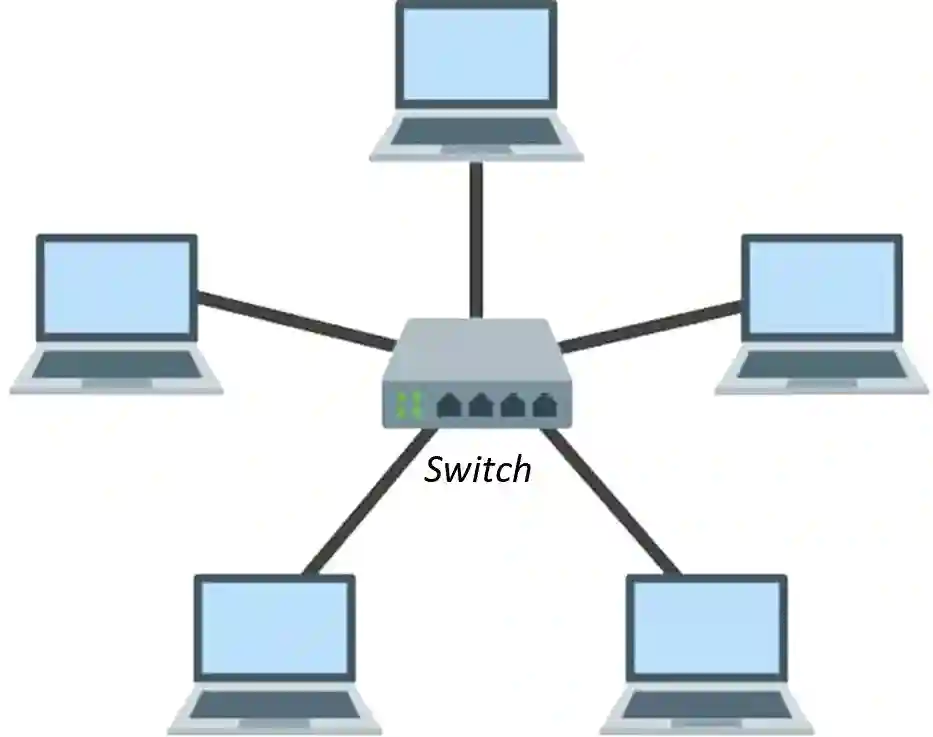
Fig: Star Topology
Fiber optics, or optical fiber, refers to the technology that transmits information as light pulses along a glass or plastic fiber. A fiber optic cable can contain a varying number of glass fibers, from a few up to a couple hundred. Another glass layer called cladding surrounds the glass fiber core.
There are 3 parts:
Bus topology is the simplest type of network. It supports a small number of computers. In this topology, all the computers are connected to a common communication medium central wire called Bus such as twisted pair, co-axial cable by the help of interface connectors. A special device terminator is used at both ends of series to absorb the signals.
In Bus topology, when node A is sending a signal to node B, the signal goes to bus and every node attached to the Bus gets a copy. But only B gets the message and all others simply ignore it.
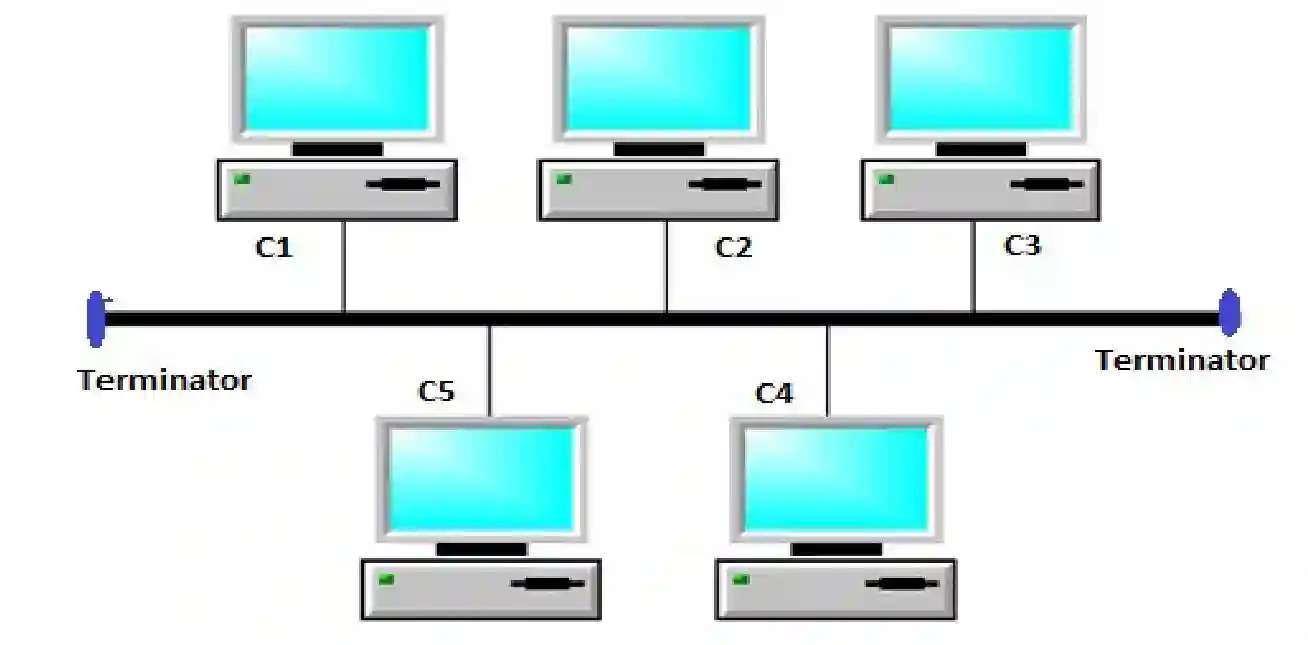
Fig: Bus Topology
A network configuration where all devices are connected to a single communication line, and data is broadcast from one device to another is called Bus topology.
Advantages: a) Only one wire is used, so it is less expensive. b) Easy to use and easy to install. c) Failure of a device/node does not affect the other devices.
Disadvantages: a) Limited computers. b) Little fault tolerance. c) Difficult to detect errors.
A type of network topology in which all the device or nodes are physically connected to a central node such as a router, switch or hub is called Star topology.
Advantages: a) Mistake Tolerance. b) Connecting several sorts of devices. c) Little likelihood of data collisions.
Disadvantages: a) More expensive. b) Critical core failure. c) Needs for more equipment.
A system of interconnected computers that enable the computer to communicate with each other and share their resources, data and applications and allow communication is known as computer network. The uses of computer network are as follow:
A system of interconnected computers that enable the computer to communicate with each other and share their resources, data and applications and allow communication is known as computer network.
Advantages:
Disadvantages:
Transmission medium is the way in which data is transmitted from one place to another. It provides a pathway over which messages can travel from sender to receiver. These pathways are called communication channels.
Transmission Medium Classification:
Wired Media: Communication devices are directly connected with each other by using some physical media like wires. It means connectivity between a source and destination using cables or wires.
Wireless Media: It refers to those channels that transmit data and information in the form of waves. If there are no physical connectors (wires) between the two communicating devices, it is called wireless transmission.
The local area network layout, also known as local area network topology, describes the physical and logical manner in which devices and network segments are interconnected. The different types of LAN topologies are as follows:
1. Bus Topology
Bus topology is the simplest type of network. It supports a small number of computers. In this topology, all the computers are connected to a common communication medium or central wire called a “Bus” (such as a twisted pair or co-axial cable) with the help of interface connectors.
Fig: Bus Topology
2. Star Topology
In a Star Topology, all the computers are connected to a central device known as a Hub or Switch using a point-to-point connection. The central node (Hub or Switch) acts as the server and other nodes are clients. Nodes are connected to the server with the help of twisted pair or optical fiber cables. It is mostly used in LANs because it is easy to maintain and install.
Fig: Star Topology
3. Ring Topology
A ring topology is a network topology arranged in a closed loop, following the concept of peer-to-peer LAN topology. In this topology, each host machine has exactly two neighbors for communication purposes using a twisted pair cable, and the last computer is connected to the first computer, creating a circular network architecture.
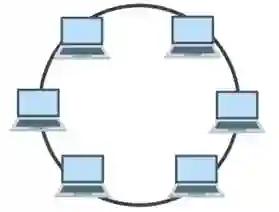
Fig: Ring Topology
4. Mesh Topology
In a mesh topology, each device is connected to every other device on the network through a dedicated point-to-point link. When we say “dedicated,” it means that the link only carries data for the two connected devices. There are several possible paths from the source to the destination. Mesh topology is mostly used in WANs or the internet. A mesh topology network can be formed using the formula = n(n-1)/2.
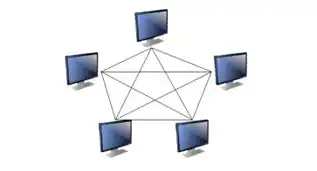
Fig: Mesh Topology
OSI stands for Open Systems Interconnection model. The OSI model was developed by the International Organization for Standardization (ISO) in 1984. It provides a logical framework for the data communication process to interact across networks. The standards were created for the computer industry to allow different networks to work together. The OSI model may also be referred to as the seven-layer OSI model or the seven-layer model.
The seven layers of the OSI model are:
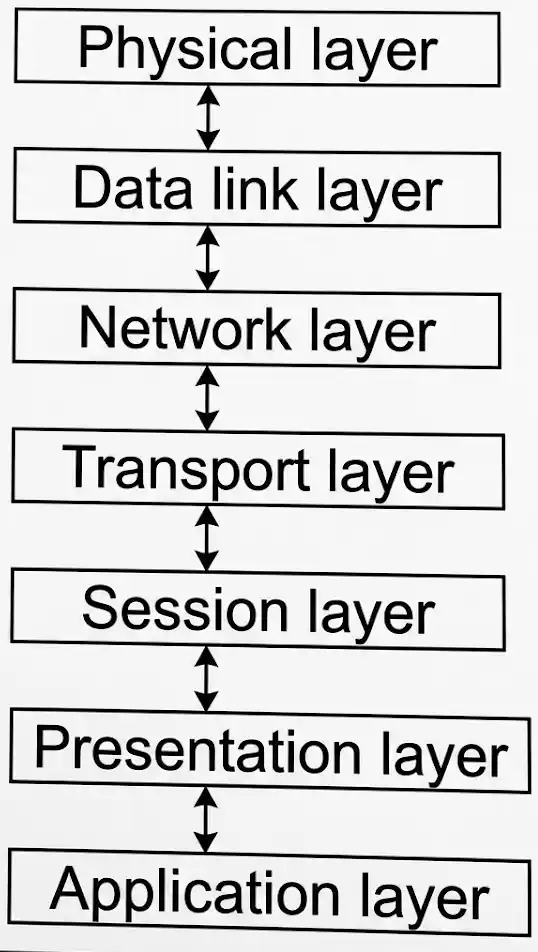
Fig: OSI Model – Seven Layers
Detailed explanation of the layers
A communication channel that carries the information from the sender to the receiver is known as transmission media. Data is transmitted through electromagnetic signals. The main functionality of the transmission media is to carry the information in the form of bits through a LAN (Local Area Network).
UTP (Unshielded Twisted Pair): UTP cable is a type of copper cable widely used for networking purposes. UTP cables consist of pairs of insulated wires that are twisted together to reduce interference and crosstalk. They are commonly used in Ethernet networks for transmitting data signals. Cables with 4 pairs use RJ-45 connectors and are used as Ethernet cables in computer networking. It is designed to counter EMI (Electromagnetic Interference), RFI (Radio Frequency Interference), and also crosstalk.
Topology refers to the physical or logical arrangement of nodes and connections in a network — how devices and cables are structured and interconnected.
Exercise 3: Long Answer Questions & Short Notes
A star network topology has a central hub to which all nodes are connected, whereas a bus network topology has a single central cable (the bus) to which all nodes are connected.
In a star topology, data transmission is managed through the central hub, making it easier to isolate faults and manage the network. The star topology utilizes the switch or central hub for broadcasting data and information to all the devices present in a network. On the other hand, the bus topology utilizes just a single cable that connects all the peripheral devices.
A star topology has a high implementation cost because of the central hub and the extra wires required for connection. A bus topology is less expensive than a star topology. Data transmission is faster in a star topology; in a bus topology, the data is transmitted slower as compared to a star topology.
Bus topology is simple to install, usually cheaper than other topologies, and makes it easy to add systems to the network. It is great for small networks, and a single failure (unless it is the central point) won’t bring down the whole network. Star topology is easier to troubleshoot, and fixing issues should be quicker as each device has its own cable. It is also more secure due to this independent cabling structure.
Cat-6 cabling consists of four pairs of twisted copper wires, making use of every strand as opposed to its predecessor, Cat-5, although they are similar in composition. This allows Cat-6 to double the speed, facilitating faster networks and meeting modern efficiency expectations. While Cat-6 can support data transfer speeds of up to 10 Gbps, multimode fiber can support much higher speeds of up to 100 Gbps.
Cat-6 Features
Fiber Optic Cable
Fiber optic cable is made of high-quality thin glass or plastic and is used to transfer digital data signals in the form of light up to a distance of thousands of miles. It uses the concept of the reflection of light through a core made up of glass or plastic.
Features of Fiber Optic Cable:
It’s challenging to define which cabling is generally better, considering each of their qualities accommodates specific needs. Fiber optics can be seen as better for businesses with a long-term vision for their networks. At the same time, Cat-6 is identified as a more robust solution for smaller workplaces.
Star topologies have the benefit of no disruption to service in the event of a failure but require more interfaces than a ring topology. Depending on a number of factors, including speed and the type of fiber used, there may be a cost impact.
Advantages of Star Topology
Disadvantages of Star Topology
Ring topology offers simplicity, efficient data transfer, reduced network congestion, and cost-effectiveness.
Advantages of Ring Topology
Disadvantages of Ring Topology
Regardless of the number of computers, the most relevant cable for connecting any computer to a LAN is twisted pair Ethernet. Cat-7 cables feature improved shielding to reduce crosstalk and external interference. It is considered the best Ethernet cable.
 Physics (भौतिक विज्ञान)
 Chemistry (रसायन विज्ञान)
 Biology (जीव विज्ञान)
 Mathematics (गणित)
 English (अंग्रेजी)
 Nepali (नेपाली)
 Computer Science (कम्प्युटर विज्ञान)
 Account (लेखाशास्त्र)
 Economics (अर्थशास्त्र)
 Business Studies (व्यवसाय अध्ययन)
 Social (सामाजिक)