
Computer Network and Communication
Class 10 Computer Science
Comprehensive study guide, network models, protocols, and fully solved CDC textbook exercises for SEE preparation.
Welcome to the ultimate guide on Computer Network and Communication. This is Unit 1 for Class 10 Computer Science students preparing for their SEE board exams.
Understanding Computer Network and Communication is essential in today’s interconnected digital age. In this guide, you will learn about network types, transmission media, network topologies, protocols, IP addressing, and find complete solutions to textbook exercises.
For a broader understanding, you can explore the Wikipedia guide on Computer Networks.
1. Comprehensive Theory of Computer Network and Communication

1.1 Introduction to Computer Network and Communication
A computer network is a group of two or more computers and autonomous devices connected together to share data, resources (hardware/software), and exchange messages. These connections are made using physical wires (guided media like Ethernet cables, coaxial cables, or fiber optics) or wireless signals (unguided media like Wi-Fi and Bluetooth).
Today, computer networks form the backbone of modern digital life, enabling:
1.2 Fundamental Network Parameters
To understand how data travels across a network in Computer Network and Communication, we must analyze three key technical concepts: Broadband, Bandwidth, and Throughput.
A. Broadband
Broadband is a high-speed, high-capacity internet connection that allows the transmission of large amounts of data simultaneously. It has completely replaced old dial-up internet connections. The major broadband types are:
B. Bandwidth vs. Throughput
$$\text{Throughput} \le \text{Bandwidth}$$
Both are measured in:
1.3 Mobile Network Generations
Mobile communication has evolved rapidly over successive generations to deliver faster speeds and richer digital experiences.
| Feature / Generation | 3G (Third Generation) | 4G (Fourth Generation / LTE) | 5G (Fifth Generation) |
|---|---|---|---|
| Primary Goal | Web browsing, basic apps, and email on mobile devices. | High-speed mobile broadband, HD video streaming, and online gaming. | Ultra-high speeds, massive device capacity, and extremely low latency. |
| Features Offered | Multimedia messaging, video calls, and mobile web services. | High-speed data, HD streaming (HD/4K), and low latency. | Ultra-fast access, Support for AR/VR, Autonomous driving, and IoT. |
| Impact | Made smartphones functional for learning, maps, and entertainment. | Enabled smooth online remote work, HD streaming, and mobile gaming. | Powering smart cities, real-time automation, and self-driving vehicles. |
1.4 How Data Travels: Data Packets and Frequency
A. Data Packets
When files or messages are transmitted over a network, they are not sent as one single, massive block. Instead, they are sliced into smaller units called data packets.
B. Frequency
Frequency refers to the number of completed wave cycles (vibrations) of an electromagnetic signal sent over a communication channel in one second. It determines the capacity and distance characteristics of wireless media.
Measurement Units:
Core Frequency Allocations:
1.5 Communication Modes
The flow direction of data between a transmitter and a receiver is governed by the communication mode.
Examples: Radio broadcast, television broadcast, newspapers, books.
Examples: Walkie-talkies, wireless tactical handsets.
Examples: Mobile phones, telephone systems.
1.6 Transmission Media
Transmission media refers to the physical or logical pathway through which data travels from one device to another in a network.
A. Guided Media (Wired)
Guided media uses physical cables or wires to guide the signals along a specific path.
B. Unguided Media (Wireless)
Unguided media transmits data signals through the air using electromagnetic waves without any physical path constraint.
| Guided Media | Unguided Media |
|---|---|
| Data and signals are sent through wires or cables. | Data and signals are sent through the air without wires. |
| Not affected by weather conditions like rain or wind. | Can be affected by weather conditions like rain or wind. |
| Used to connect close devices such as in a Local Area Network (LAN). | Used to connect devices far away such as in a Wide Area Network (WAN). |
| Provides a fixed path or direction for data. | No fixed path; data travels freely through the air. |
| Also called wired or guided media. | Also called wireless or unguided media. |
| Examples: CAT6 cable, Coaxial cable, Optical fiber. | Examples: Wi-Fi, Bluetooth, Microwave, Satellite, Infrared. |
1.7 Connectors and Networking Devices
A. Connectors
B. Network Devices
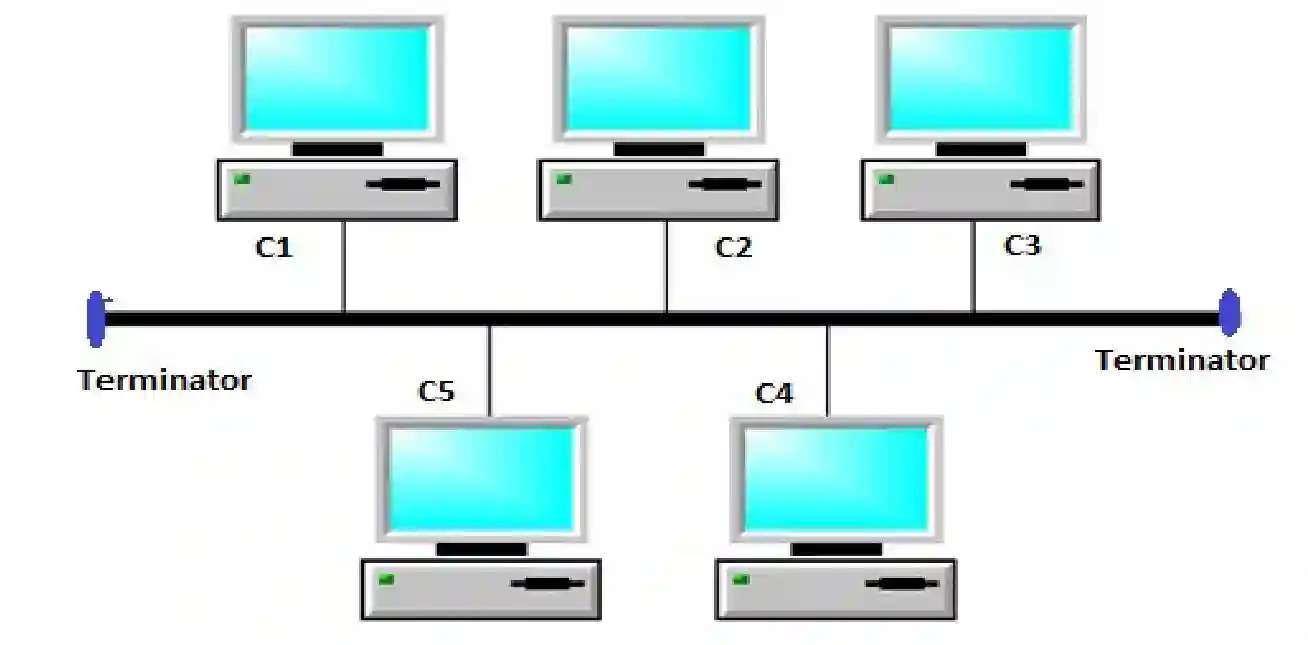
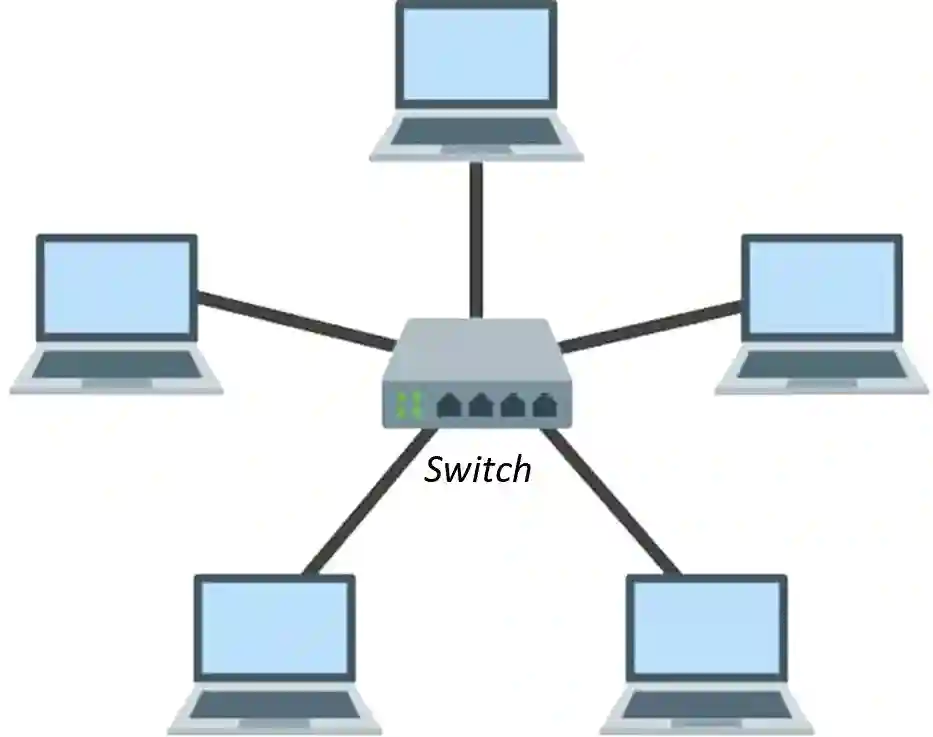
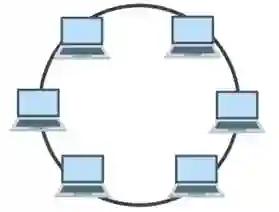
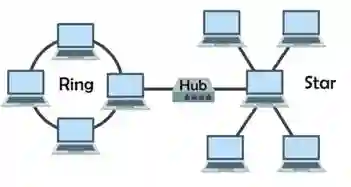
1.8 Network Topology
Network topology refers to the physical or logical layout/pattern in which computers and devices are interconnected.
1.9 Coverage-Based Network Types
Networks are classified globally by the physical distance they span.
1.10 Network Architecture and Protocols
A. Network Architecture
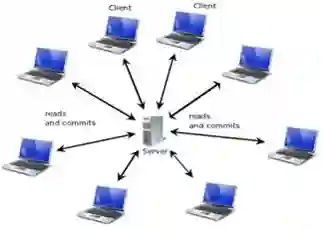
Strengths: Centrally administered, high security, and easy centralized backups.
Weaknesses: High cost, and if the central server fails, the entire network goes down (single point of failure).
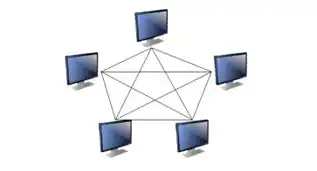
Strengths: Cheap to set up, highly resilient (no single point of failure), and does not require complex central server operating systems.
Weaknesses: Harder to secure, and data backups must be run on each machine individually.
B. Network Protocols
A protocol is a standardized set of rules that computers follow to communicate over a network.
1.11 IP Addressing: IPv4 vs. IPv6
An IP Address is a unique logical numeric address assigned to every device on a network so that routers can deliver data packets to the correct destination.
| Feature | IPv4 (Internet Protocol Version 4) | IPv6 (Internet Protocol Version 6) |
|---|---|---|
| Address Length | $32\text{-bit}$ address space. | $128\text{-bit}$ address space. |
| Address Space Size | Supports approx. $4.29 \times 10^9$ addresses. | Supports approx. $3.4 \times 10^{38}$ addresses. |
| Representation | Dotted-Decimal (e.g., $192.168.1.1$). | Hexadecimal with colons (e.g., $2001:0\text{db}8:85\text{a}3::8\text{a}2\text{e}$). |
| Configuration | Manual or DHCP. | Automatic (Stateless Autoconfiguration) or DHCPv6. |
| Security | Security features (IPsec) are optional. | Built-in encryption and authentication. |
| Header Size | Variable header size ($20\text{ to }60\text{ bytes}$). | Fixed header size of $40\text{ bytes}$. |
1.12 Internet, Intranet, and Extranet
1. Write the full forms of the following abbreviations:
2. Choose the correct answer from the given options:
Select an option to view the correct answer and justification.
Justification: DSL, Fiber optic, and Cable internet are all high-speed connection systems that allow transmitting massive amounts of data simultaneously, fitting the definition of broadband.
Justification: Throughput measures the actual volume of data that successfully travels through a network in real-world conditions, whereas bandwidth represents the theoretical limit.
Justification: Large digital data is segmented into small pieces called packets before transmission to make transfer fast and reliable.
Justification: Guided media requires a physical path. Fiber optic cable is a physical glass/plastic medium, while infrared, microwave, and laser are wireless (unguided) signals.
Justification: Sending signals up from an Earth-based station to a satellite in orbit is called an “uplink,” whereas receiving signals from a satellite is called a “downlink.”
Justification: RJ-45 is the standard physical 8-pin connector used to terminate twisted pair copper cables (like CAT6) for Ethernet networks.
Justification: Network topology is the physical or logical design, pattern, and mapping of how nodes and connections are arranged.
Justification: In star topology, all individual computers connect directly to a single central network device, such as a switch or a hub.
Justification: A Wide Area Network (WAN) spans across cities, countries, or globally to interconnect smaller networks (like LANs).
Justification: IRC (Internet Relay Chat), Telnet (remote terminal connection), and Email are all traditional and modern services running over the Internet.
Justification: FTP stands for File Transfer Protocol, specifically designed to upload, download, and manage files on remote servers.
Justification: An IPv4 address is exactly $32\text{-bits}$ long, represented as four decimal numbers (octets) separated by dots (e.g., $192.168.1.1$).
Justification: An IP address is a unique numerical label assigned to each active interface on a network to route data correctly.
Justification: SMTP (Simple Mail Transfer Protocol) is the standard protocol utilized to send and relay outgoing emails across networks.
Justification: Repeaters operate on the physical layer to receive attenuated (weakened) incoming data signals and regenerate them to travel further.
3. Write short answers to these questions.
Differences: Broadband provides high speeds (Mbps to Gbps), remains “always-on” without blocking telephone lines, and uses fiber, cable, or DSL. In contrast, dial-up connections are extremely slow (typically limited to $56\text{ kbps}$), temporary, and tie up the user’s home telephone line.
It is measured in units of bits per second (bps), kilobits per second (kbps), megabits per second (Mbps), and gigabits per second (Gbps).
Instead of sending a file as a single block, it is broken down into packets. Each packet contains a section of the user data (payload) along with control metadata (header) containing the sender and receiver IP addresses.
It determines the data capacity and transmission distance of the signal, and is measured in Hertz (Hz), Kilohertz (kHz), Megahertz (MHz), and Gigahertz (GHz).
It intercepts weakened or distorted data signals as they travel through cables, boosts and regenerates them to their original strength, and sends them back out on their path.
Usefulness: It enables quick communication (emails, video conferencing), allows multiple users to share expensive hardware (like printers and storage servers), secures central files, and lets people access web-based services.
Additionally, it eliminates the expensive purchase and complex physical installation of cables, and supports smart IoT devices, smartwatches, and smartphones.
It is commonly used to terminate copper twisted-pair Ethernet cables (like CAT6) to plug them securely into computers, routers, switches, and wall sockets.
Its main function is to convert electrical signals from copper Ethernet cables into optical light signals for fiber-optic lines, and vice versa. This allows networks to expand beyond copper’s $100\text{-meter}$ limit.
Throughput is the actual volume of data successfully transmitted and received over a network channel under real-world conditions, and is usually lower than bandwidth due to signal noise and congestion.
A wireless router converts electrical data into radio signals and broadcasts them. The recipient device’s wireless adapter intercepts these radio waves and translates them back into digital binary data ($0$s and $1$s).
These packets are converted into electrical, light, or radio signals and sent through transmission media. Guided by switches and routers, the packets travel across optimal paths, and are assembled back in order at the destination device.
Each node receives the data packet, reads the destination address, and if the packet is not meant for it, regenerates and passes it on to the next adjacent machine in the circle until it reaches the correct recipient.
4. Write long answers to these questions.
Differences between Guided and Unguided Media:
| Criteria | Guided Media | Unguided Media |
|---|---|---|
| Basic Definition | Sends signals through a physical, bounded cable path. | Sends signals wirelessly through the air or space. |
| Path Traveled | Provides a fixed path or physical direction for data. | No fixed physical path; waves travel freely in all directions. |
| Environmental Impact | Highly stable; not affected by weather conditions like rain or wind. | Susceptible to weather interference (fog, rain, physical barriers). |
| Range / Application | Used mostly to connect close devices inside buildings (LANs). | Used to connect distant devices or highly mobile gadgets (WANs). |
| Typical Examples | CAT6 cable, Coaxial cable, Fiber-optic cable. | Wi-Fi, Bluetooth, Satellite, Infrared, Microwaves. |
| Feature | Local Area Network (LAN) | Metropolitan Area Network (MAN) |
|---|---|---|
| Geographic Span | Limited to small areas like a single room, school, lab, or office building. | Spans an entire city, municipal area, or metropolitan valley. |
| Coverage Radius | Typically covers up to $1\text{ kilometer}$. | Covers ranges from a few kilometers up to $50\text{–}100\text{ kilometers}$. |
| Data Transfer Speed | Extremely fast ($100\text{ Mbps}$ to $10\text{ Gbps}$). | Moderately fast; slower than LAN but faster than WAN. |
| Ownership | Normally owned privately by a single person, school, or organization. | Owned by a consortium of companies, ISPs, or local governments. |
| Error Rates | Very low propagation delay and low data transmission errors. | Higher transmission errors and propagation delay compared to LAN. |
| Typical Applications | A school’s computer lab network or home Wi-Fi setup. | Cable TV network distribution across a city or inter-campus banking network. |
| Feature | Client-Server Architecture | Peer-to-Peer (P2P) Architecture |
|---|---|---|
| Core Model | Uses high-powered, dedicated computers (Servers) acting as a central controller. | Every machine connected to the network has equal roles and capabilities. No central controller. |
| Roles | Distinct roles: Clients connect to request services (file retrieval, web pages) from the Server. | Every computer (peer) acts as both a server and a client simultaneously. |
| Resource Management | Centralized. Servers store data, manage security policies, and host applications. | Decentralized. Users are responsible for managing their own files and sharing local resources. |
| Key Advantages | High security, simple centralized backups, and smooth scalability. | Very inexpensive to set up and highly resilient. |
| Disadvantages | Vulnerable to complete network failure if the primary server goes down (single point of failure). | Lacks central administration; backups and security policies are complex to enforce as the network grows. |
| Operating System | Requires expensive, specialized Server OS (like Windows Server or Linux). | Uses standard consumer OS (like Windows 11 or macOS). |
For a school setting up a network across three closely situated buildings, a Local Area Network (LAN) (often specifically referred to as a Campus Area Network / CAN, which is a collection of interconnected local networks) should be used.
Justification:
Support Details:
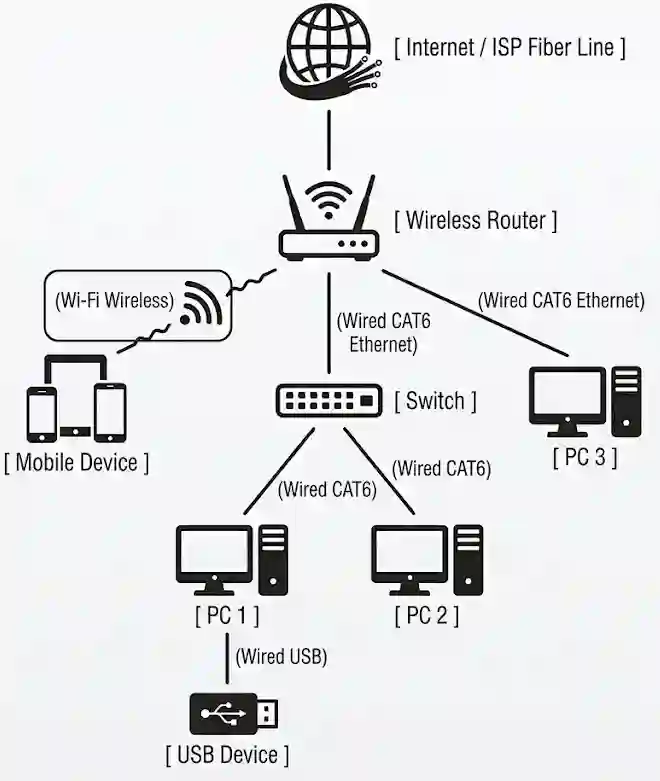
2. Connection Types and Applied Technologies:
• USB Cable: Connects the printer to PC 1 (which then shares it over the network).
For a very small office (typically with $10$ or fewer employees and devices), a Peer-to-Peer (P2P) network is generally more suitable and practical. However, if the office expects rapid growth or handles sensitive customer information, a Client-Server network becomes necessary.
Justification Comparison:
| Feature | Peer-to-Peer (P2P) – Suitable for Small Offices | Client-Server – Better for Large / Growing Offices |
|---|---|---|
| Cost | Very Low. Uses standard consumer-grade PCs and standard OS (Windows 11). No expensive server hardware or software licenses are required. | High. Requires a dedicated, high-performance server machine, Server OS (like Windows Server), and client access licenses (CALs). |
| Management | Decentralized. Easy to set up without an IT professional. Each user manages their own device, and the office does not need a full-time system administrator. | Centralized. Requires a dedicated IT technician or administrator to maintain the server, manage directories, and handle configurations. |
| Security | Basic. Security is handled individually on each machine. If a user chooses a weak password, that machine is vulnerable, but other machines remain isolated. | Excellent. High security. User access, file permissions, security patches, and firewalls are managed centrally from the server. |
| Scalability | Poor. As the office grows past $10\text{-}15$ users, managing separate files, backups, and passwords on every single device becomes disorganized. | Excellent. Highly scalable. Adding $50$ new users or computers is simple because all configurations are managed from one central server. |
2. How the Devices Communicate:
📚 Also Read: Class 10 SEE Notes
Computer Science Units
Unit 1: Computer Network
Unit 2: DBMS Notes
Unit 3: Multimedia
Unit 4: Python Programming
Unit 5: AI & Tech
Other Subjects
 Science (विज्ञान)
 C. Mathematics
 English
 Economics